DNS Exploration Part 3 - Miscellaneous Information About DNS
My acquaintance Vulcan, who runs a home server blog, was a big help in filling gaps in my network knowledge and figuring out which keywords to look up.
DNS Exploration Series
- DNS Exploration Part 1 - The Flow of DNS Requests That Turn Domain Names into IP Addresses
- DNS Exploration Part 2 - How Is DNS Structured?
- DNS Exploration Part 3 - Miscellaneous Information About DNS
Introduction
In this article, I included topics I learned while researching DNS but couldn't fit into the previous posts without disrupting their natural flow. I cover a brief history of DNS, security considerations, other features, and where DNS belongs in the OSI 7-layer model.
Before DNS
The modern internet is based on RFC 791 Internet Protocol, published in 1981. This RFC defined the 32-bit address format now known as IPv4 and communication based on it, forming the foundation of how the Internet Protocol works.
The problem was that addresses alone made it hard to identify a target. For example, the IPv4 address 163.239.1.1 is assigned to Sogang University. But seeing that address does not naturally make you think of Sogang University. That is why host names appeared. A host name like sogang.ac.kr is much easier to remember and understand. Then how do we map that to an IP address? As ideas around that problem evolved, DNS emerged.
HOSTS.TXT
In the early days of the internet, everyone shared a file that mapped host names to IP addresses. This file was called HOSTS.TXT, a name already used in ARPANET, the predecessor of the internet.
When it began to be used on the internet as well, the file was managed by SRI-NIC (Stanford Research Institute Network Information Center), one of the institutions that had major influence since the ARPANET era. It is said that the file could be updated by sending email to HOSTMASTER@SRI-NIC.
Its specific management rules and format are described in RFC 952. You can also see the HOSTS.TXT file used at the time in the HOSTS.TXT archive. You can even find names like KOREA-EMH, which appears to have been a Korean host.
In this way, host name to IP address mappings were managed manually in the early internet. This approach is called the HOSTS.TXT method, and it still survives on many operating systems as the /etc/hosts file.
# 터미널에서 /etc/hosts 확인하기
$ cat /etc/hosts
127.0.0.1	localhost
255.255.255.255	broadcasthost
::1             localhost
# ...
The Arrival of DNS
As the internet grew, this approach naturally ran into limits. Since duplicates and other issues had to be prevented, the cost of managing the HOSTS.TXT file kept increasing, but this was an era before people really thought in terms of dedicating substantial resources to that kind of management. Also, a centrally managed system did not match the distributed nature of the internet.
The role of the internet also changed. In the past, the internet was a single network connecting institutions that operated large time-sharing systems. But computers became personal devices rather than institution-owned time-sharing systems. The internet also evolved into a network of networks, connecting local networks made up of these personal computers. To adapt to that change, the way the internet managed host names and IP addresses also had to change.
So John Postel and Paul Mockapetris, both part of the group of internet pioneers, proposed DNS. DNS stands for Domain Name System, a distributed database system that maps host names to IP addresses. DNS was first defined in 1983 in RFC 882 and RFC 883, and later evolved into RFC 1034 and RFC 1035. DNS began to see practical use around 1985.
DNS and Security
DNS is also a server and a networked system, so it can be a target of attacks. Let's briefly look at some of those attacks and the techniques used to defend against them.
DNS Reflection Attacks
Earlier, I explained that DNS servers handle delegation in the hierarchy through NS records. When one DNS server passes a query to another, it responds with both an NS record containing the host name of the delegated DNS server and an A record containing the IP address of the DNS server receiving the delegated query. This mechanism can be abused for attacks.
As mentioned before, DNS uses the UDP protocol. The problem with UDP is that it is vulnerable to IP spoofing. Because of that, if the source IP address is forged, the response to a DNS query sent by the attacker's DNS server can be redirected somewhere else. At that point, the attacker amplifies the attack packet by making the DNS server send a response much larger than the query itself.
For example, if a query is sent with the host name . and type NS, the victim receives a response much larger than the original query. Quantitatively, a roughly 60-byte query can generate an attack packet of 512 bytes or more.1
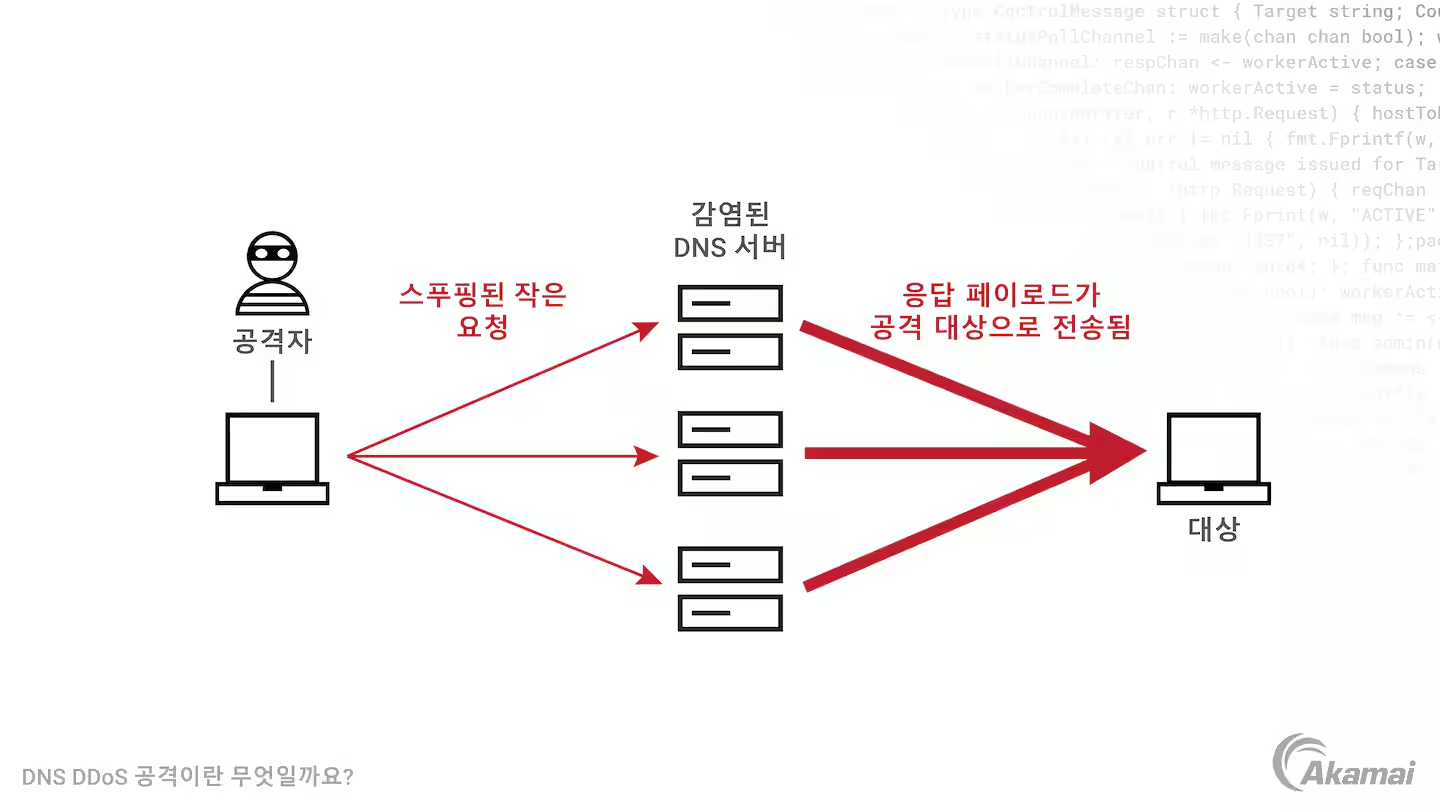
The most basic way to prevent this attack is to restrict which resolver IP addresses can access the DNS server. For example, if you configure a full resolver yourself, you might choose to accept only queries coming from localhost.
However, public DNS resolvers or DNS servers that accept third-party DNS queries use various additional protections against DNS reflection attacks. They may deploy measures to prevent IP spoofing, disable ANY requests that ask for the largest possible DNS response, or delay queries from specific resolvers or clients based on load monitoring. For more details, see America's Cyber Defense Agency's document on DNS amplification attacks.
DNSSEC(DNS Security Extensions)
It is possible to attack DNS servers with DDoS attacks, or cause clients to query illegitimate DNS servers so that users receive malicious IP addresses in response. Techniques such as DNS cache poisoning exist for this purpose.
If such an attack succeeds, the user may connect to a website served from a malicious IP address without noticing anything unusual. To prevent this, there is an extension called DNSSEC(DNS Security Extensions).
DNSSEC is an extension for validating DNS responses. Specifically, it verifies that they came from a legitimate source. DNSSEC adds new DNS record types such as RRSIG, which contains cryptographic signatures, making it possible to verify that DNS record responses came from the appropriate authoritative DNS server and were not modified in transit. It uses public-key cryptography.
The process works like this. Records with the same label and type are grouped into a resource record set (RRSet), and a digital signature for that set is generated and stored in an RRSIG record. The public key needed to verify that signature is stored in a DNSKEY record.
When following the hierarchical DNS structure described earlier, trust is established by verifying at each upper level that records in the level below have not been altered. For this, the DS record, which stores a hash of the DNSKEY, is used.
Putting that together, DNSSEC works by having the local DNS server validate the RRSIG signature with the DNSKEY when it receives a DNS record response, and use the upper DNS server's DS record to verify that the lower DNS server's records have not been altered. In this way, it verifies the source and integrity of DNS responses.
This upper-level-to-lower-level verification model has one problem: there is no higher layer that can verify the root DNS server's information. So the signature used to validate the root DNS server is determined in the root signing ceremony, where 14 people selected from around the world gather to sign the root DNSKEY RRset.
This encryption and validation process is fairly complex, and it is not closely tied to the core DNS behavior I originally had in mind, so I kept the explanation brief. For more detail, see How does DNSSEC work? and What is DNSSEC and how does it work?.
Other DNS-Related Information
DNS as a Web Server Load Balancer
A DNS server can return multiple IP addresses in a response. For a web service backed by multiple IP addresses, this can be used to try to distribute load across those servers.
A heavily used domain like "google.com" has multiple different IP addresses. The DNS server can return them in rotation. For example, suppose "google.com" has three IP addresses. In that case, the DNS server can return them in the order IP 1, IP 2, IP 3 for the first response, IP 2, IP 3, IP 1 for the second, and IP 3, IP 1, IP 2 for the third.
First query response          Second query response      ....
+-----------------+    +-----------------+
| IP address 1    |    | IP address 2    |
+-----------------+    +-----------------+
| IP address 2    |    | IP address 3    |
+-----------------+    +-----------------+
| IP address 3    |    | IP address 1    |
+-----------------+    +-----------------+
When clients receive multiple IP addresses like this, they usually send the HTTP request to the first IP address. Because of that, service operators can use this method to distribute request load across servers.
DNS Is in the Application Layer
When describing network architecture, people often use the OSI 7-layer model. So which layer does the DNS protocol belong to in that model?
From personal experience, I remember being asked this in an interview and struggling because I did not know the answer. Now I do: DNS is a layer 7 protocol, part of the application layer.
The application layer is the layer closest to the user. When we think of what a network does, we usually think of exchanging data between different endpoints on the network, and the application layer defines protocols for exchanging messages containing that data between those endpoints. Typically, it defines things like the following:
- what messages are exchanged (request messages, response messages, and so on)
- the syntax that composes different message types
- the meaning of each field in a message
- when and how a process sends messages and responds
The DNS protocol fits this application-layer definition very well. It defines how messages are exchanged between different network endpoints: the client and the DNS server.
Also, DNS messages use port 53 and are transmitted over UDP, which is a transport-layer protocol. That also supports the idea that DNS sits above the transport layer in the abstraction stack, and is therefore an application-layer protocol. Of course, in the OSI 7-layer model there are the session layer and presentation layer between the transport layer and application layer, but in practice the boundaries between layers 5, 6, and 7 are often unclear. In that case, the socket serves as the interface between the application layer and the transport layer.
DNS is not directly tied to user-facing applications in the way HTTP or SMTP for email is. Instead, DNS hides the complexity of internet infrastructure from users and allows them to use host names conveniently. But if you look at how it works, it clearly shows the characteristics of an application-layer protocol.
References
Paul V. Mockapetris, Kevin J. Dunlap, Development of the Domain Name System
James F. Kurose, Keith W. Ross, written by, translated by Choi Jong-won, Kang Hyun-guk, Kim Gi-tae, and 5 others, Computer Networking A Top-Down Approach, 8th edition
Gijutsu-Hyoronsha Editorial Department, edited, translated by Jin Myeong-jo, Infrastructure Engineer's Textbook System Construction and Management Edition, Chapter 5, 'The Modern DNS Textbook
cloudflare, How does DNSSEC work?
https://www.cloudflare.com/ko-kr/learning/dns/dnssec/how-dnssec-works/
cloudflare, DNSSEC Root Signing Ceremony
https://www.cloudflare.com/ko-kr/learning/dns/dnssec/root-signing-ceremony/
IBM Technology, "What is DNSSEC (Domain Name System Security Extensions)?"
https://www.youtube.com/watch?v=Fk2oejzgSVQ
What is a DNS DDoS attack?
https://www.akamai.com/ko/glossary/what-is-a-dns-ddos-attack
Footnotes
-
Gijutsu-Hyoronsha Editorial Department, edited, translated by Jin Myeong-jo, Infrastructure Engineer's Textbook System Construction and Management Edition, p.271 ↩