Predictable Development - Thoughts about Reducing Cognitive Load and Increasing Productivity
Background
Do you have enough time to work? I'm not simply asking whether you have enough time. Of course you don't. I'm also not asking whether you have more work than the time you've been given. Of course you do. Ask yourself, "How would I work if I had enough time?" If that answer is very different from how you're actually working, then you do not have enough time to work.
Kent Beck, translated by Ahn Younghoe, "Kent Beck's Tidy First?" p. 91
I am the only dedicated frontend engineer at my company. But even though there is only one frontend headcount, traces of more than five predecessors remained. Since several people had cycled through one or two frontend roles, I found myself facing inconsistent folder structures and components left behind with overlapping or unclear responsibilities.
I fixed and organized them bit by bit. I also kept adding new features and fixing bugs. This is still ongoing.
While doing that, I tried to follow these rules. I still do.
- Write code with future me—and anyone else unfamiliar with this codebase—in mind
- Design code and components with an intuitive structure that can be read top to bottom, where information is absorbed in sequence
- Make each component responsible for only one thing, and classify it by role
- Build a structure flexible enough to accept changes
- Keep the rules consistent, even if I am the only one following them
Then one day I had this thought. Aren't these rules I am trying to follow really just a series of obvious statements that most developers already know? I had heard all of these things not long after I first started programming. So did my predecessors really leave behind the legacy code I was seeing because they knew none of this?

At first, I thought it was because they were the kind of developers who simply did not care about code quality at all. But within just a few months, I found myself—embarrassingly enough—writing patchwork code that broke conventions, or abandoning the folder structure I had been cleaning up consistently and turning it messy again. I told myself, or perhaps made excuses, with reasons like "It would take too much effort to do this perfectly right now" or "This is too large to handle alone." When I caught myself doing that, I started wondering what I should really be pursuing consistently.
Between principles everyone knows but almost no one truly follows. In an environment and timeline where insisting on theoretically perfect, clean code is not realistic. What direction should I actually move in, and what standards should I use to make decisions? I still do not know the answer, and maybe there is no such answer. But I wanted to get a little closer to one, so I am writing down some thoughts and examples that helped me move in that direction.
I wanted to turn principles that people merely "know" into something more concrete and tangible. I wanted to write these thoughts as if I had my ideas firmly figured out, and as if I were confident in them. I believe it will help me too if the ideas I stated confidently end up breaking down in a reasonable way.
I could try to write something that can never be wrong. I could say that most things are uncertain and case by case. Then many people would reluctantly agree. But I would learn nothing from saying that, so I will at least act confident and say what I think.
Thoughts on the Essence
If I had exactly one hour to chop down a tree, I would spend 45 minutes sharpening the axe.1
Why should we write consistent code? Why do we define conventions and spend time refactoring? Why are there rules for writing good code, and why should we spend time thinking in order to follow them?
Some concepts, like REST API, are widely misunderstood and hard to apply perfectly in typical web development. Still, even though you could choose to build one more page or one more function instead of spending time trying to follow good principles, I think those principles exist because they are originally the faster way to produce results.
Once a project is in the hands of developers, most of the planning usually ends up becoming implemented features to some extent.2 Then at this stage, what is needed for faster development? I think an environment where you can focus on the work that actually requires your attention is very important.
For example, suppose you are building a chat feature. Chat is often more complex than a simple API integration, and in most cases there is much more to think about. But then you try to reuse an Input UI component another teammate implemented for the chat input box, and it turns out that component contains logic related to writing comments. For example, it has props like showComment.
What do you do? Do you pause chat development, fix that component first, split Input and CommentInput, and then come back? Or should you implement ChatInput from scratch? There may be other options too. But whatever you choose, one thing is certain: you have already lost focus on chat itself. If you could have used Input as-is, you would have been able to stay focused on the chat feature without that distraction.
So how do we create an environment where we can "focus on what we need to focus on"—an environment where we can work more productively? In the end, it comes down to those development principles every developer has probably seen to death.
Create intuitive, easy-to-learn, consistent rules. Make it possible to obtain as much information as possible from the code. Ensure that each function or component stays within its role and context, and give them names and props that make those roles intuitive. Avoid leaky abstractions. Apply these rules consistently across the entire project so that once you know the rules, the code becomes predictable.
Being good at development, I think, goes beyond merely knowing these rules. It comes from understanding the original purpose—doing things better—and having the strength to keep following those rules even under tight schedules and difficult conditions.
So let us approach this more concretely. I want to talk about tools that help uphold these nice-sounding ideas and let us spend time and effort where it actually matters. And I also want to look at how we should think when writing code, through examples.
Means of Focusing on What Matters
Libraries
A great tool for creating an environment where you can focus on what matters is, unsurprisingly, libraries. They reduce the number of things you need to care about and let you focus on the feature you are trying to implement rather than all the surrounding concerns.
If you were writing code in React to fetch and use server data, you originally had to create state like isLoading and handle things in useEffect. Resolving race conditions, handling errors, success callbacks, caching, and so on were not easy to implement yourself.
But if you use TanStack Query, you can worry much less about server data fetching. The library provides features like error handling, success callbacks, and caching that are difficult to implement well on your own. It also makes it much easier to separate the management of server data from client data, which improves separation of concerns.
If you use headless UI libraries like Radix primitive or base-ui, you need to think less about accessibility and the small pieces that make up UI components. If you use UI libraries like shadcn/ui or daisyUI that also provide styling, customization may become harder, but you can delegate a fair amount of styling as well. Libraries for hard-to-build UI pieces—like sonner for toast notifications or cmdk for command menus—also reduce the burden of UX and accessibility concerns.
I am not personally a fan of TailwindCSS, but it clearly reduces the burden of naming CSS classNames or styled components. Utility libraries like lodash and es-toolkit save you from having to implement various convenience functions yourself.
The point of using these tools is to focus only on the functionality you actually need to implement. It is worth choosing libraries with that in mind.
Predictable Folder Structure
In collaborative work, I think folder structure, file placement, and file naming are highly cost-effective examples of creating and following predictable rules. Most of the work required to follow such rules is just moving files, renaming them, and fixing a few import statements—and even those are usually handled by the IDE. Yet I have personally experienced several times how much faster work becomes.
That is because even if I did not write the code, I can expect that the thing I am looking for is where I think it should be, and I can roughly predict its role from its location in the folder structure. Then I can simply reuse the existing component.
And because I do not need to assume that the component I need might be hidden in some random place, I also do not need to search all over the project wondering, "Could the component I am about to build already exist somewhere else?"
Projects where everything is perfectly set up are rare, so it matters not only that "things are where they should be," but also that I can quickly realize "if a component of this kind is not here, then it probably does not exist in the project yet" and start implementing it right away. That also has a big impact on development speed.
Even the FSD (Feature-Sliced Design) folder convention, often represented like the following, is meaningful not because it is some revolutionary classification system, but because it presents a common structure that is easier for a team to adopt quickly and easier to predict.
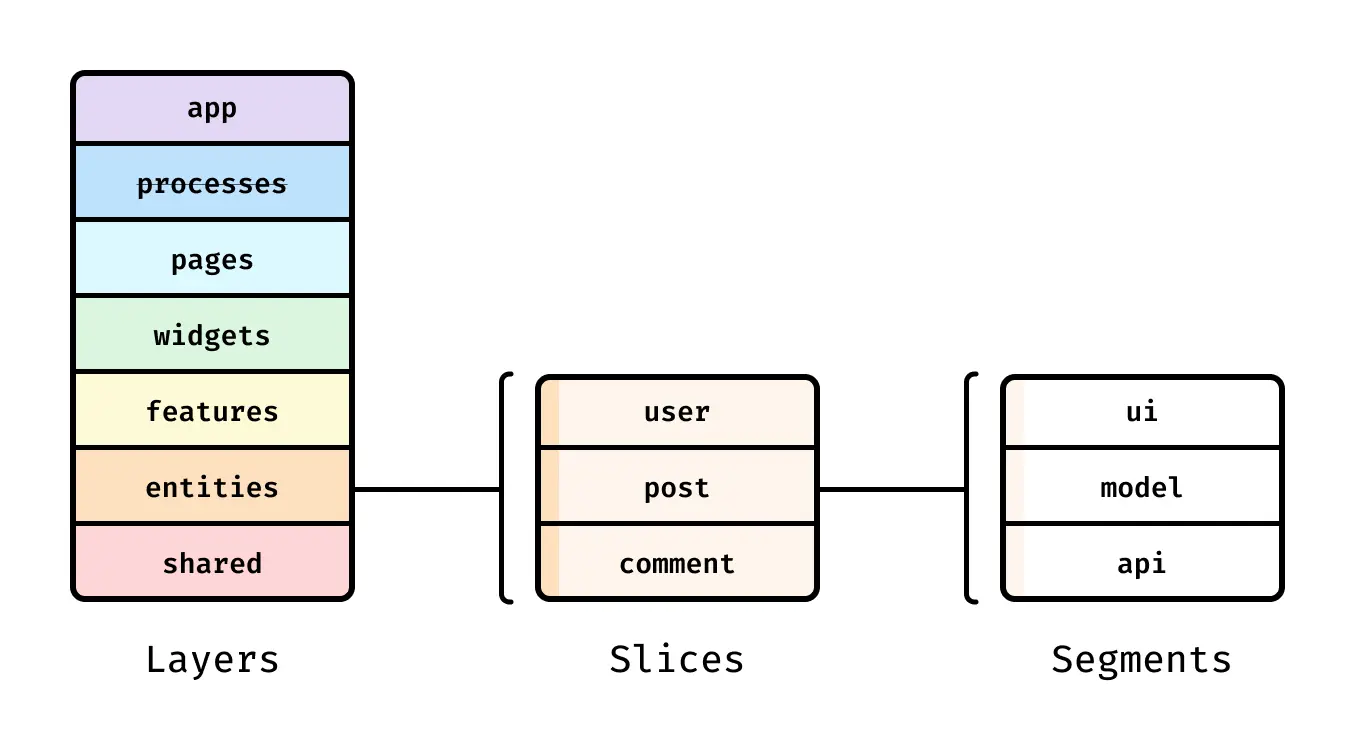
Of course, there is no single correct structure. What matters is proper classification by role and strict consistency. If I had to pick one especially important part, it would be good design and rigorous classification of "shared components." Consistency matters the most.
Personally, I have seen folder structures that did not feel intuitive at first. But humans adapt quickly to repeated structures and can apply them in new places. I also got used to unfamiliar structures faster than I expected. On the other hand, projects with a systematic folder structure but scattered exceptions to the rules were much harder to understand.
Reducing Cognitive Load with Productivity Tools
Using productivity tools improves work speed. I think this applies not only to development or team projects, but also to personal work. I personally try to learn keyboard shortcuts for programs I use frequently, as well as tools like Raycast. I am documenting what I learn in my personal archive under "Notes for Efficient Development".
But what I want to talk about here is not how to use the tools, but why we use them. Why use productivity tools, and why are keyboard shortcuts useful? Of course, compared to the extreme case of using no shortcuts at all, using them is generally better. Shortcuts for saving (command + s), copying and pasting (command + c,v), or refreshing (command + r) are used so often that memorizing them obviously saves time compared to using the mouse.
But some people do not stop there. Some deliberately learn Vim so they can minimize moving their hands to the mouse while working (and, perhaps, for a bit of style). There are also enthusiasts who write Hammerspoon Lua scripts or Raycast scripts to automate a five-minute task they do once a day. At that point, if you compare "time saved on the task" vs. "time spent learning or automating it," the cost may outweigh the benefit.
But was the real purpose of all that automation just to make a task a few seconds faster? If writing the automation script takes longer, is not doing it necessarily the rational choice? Would it have been better to spend that time shipping one more small feature? I do not think so.
That is because those principles and tools do not exist merely to cut a task from 10 seconds to 5, or down to one click. I think their real purpose is to reduce the load caused by side tasks, so that while writing code and doing necessary work, you can focus on what actually requires concentration. Focus is very easily disrupted.
For example, suppose you are writing code and need to look something up. It could be GitHub, a web search, or finding a local file—it does not matter. What matters is that you have to step outside the context of the code you were writing and think about something else.
And there are far too many distracting obstacles in the process of getting there: clicking a browser on the desktop to open it, performing a web search, opening Finder and digging through folders to find the project you want, or opening a new terminal and moving to the project path.
If you used something like Raycast file search instead, you could do the same thing in far fewer steps.
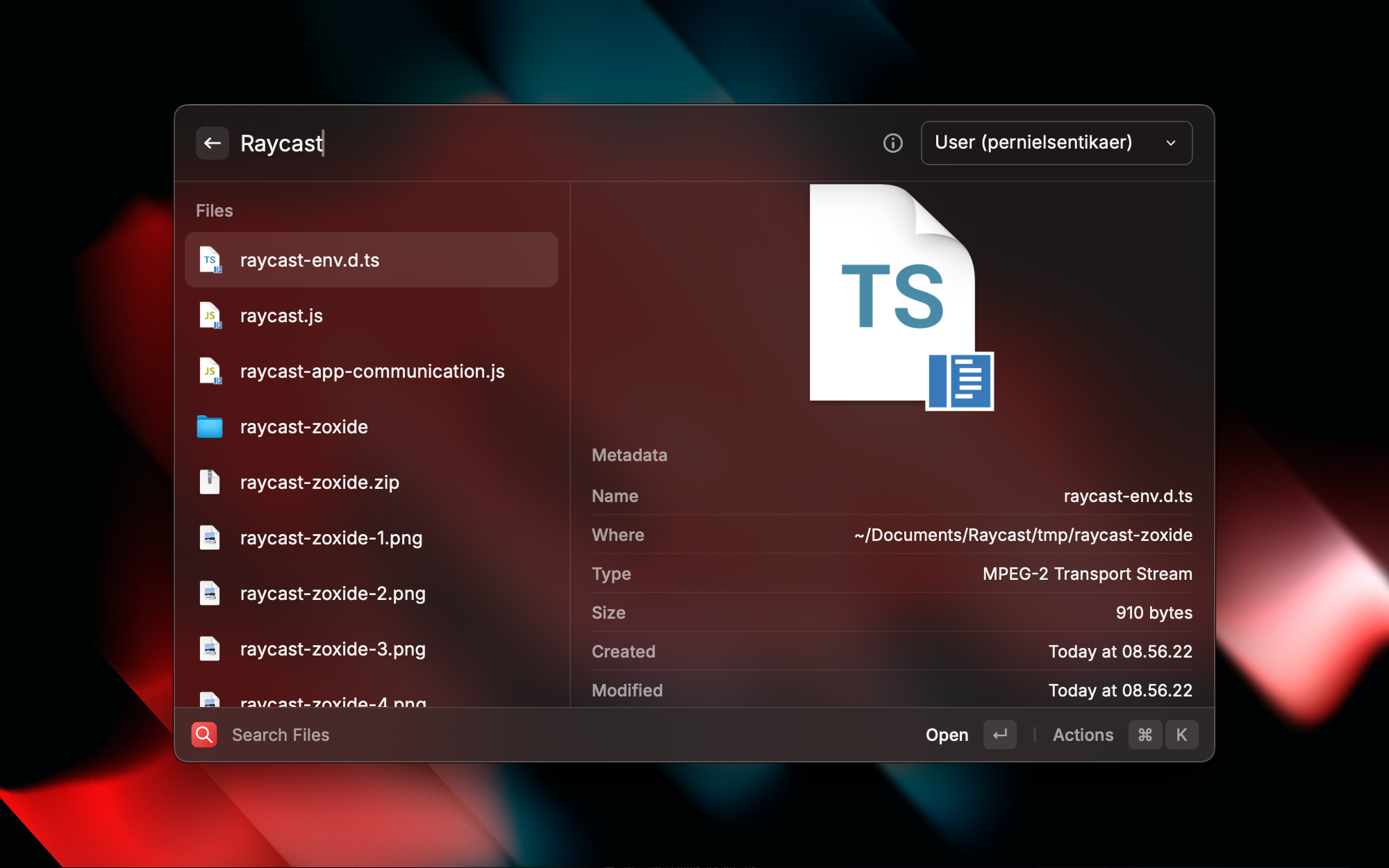 Image source: File Explorer for Mac
There are many other tasks that can also be reduced to fewer steps.
- Open the browser by clicking it in the dock -> assign a Raycast hotkey
- Find the desired project in Finder -> Raycast file search
- Web search -> Raycast browser extension
- Open terminal and navigate paths -> Raycast terminal extension + path automation tools like zoxide
Even if the actual time saved is less than 10 seconds, the key is that it prevents unnecessary mental branching and lets you go through only the required steps. Personally, I often had the experience of opening Finder, starting to search for a file, and then forgetting what I was looking for and why. It was not because file search itself takes a long time. It was because my thoughts scattered faster than I expected.
That is not because file search is such a time-consuming task. It is just that my attention drifted in that short gap. I think we use automation and tools not only to improve speed or reduce mouse usage, but to reduce these thought transitions and cognitive load.
Of course, even when using such tools, you have to design interactions so simply that you can use them almost unconsciously without switching mental context. For example, when assigning Raycast shortcuts, it is best to choose ones that can be pressed with one hand whenever possible, or ones that are easy to associate automatically through the tool name. For instance, if the shortcut to open the terminal were command + command, it might be very easy to press, but assigning Hyperkey + t is much more intuitive because it uses the initial of terminal.
If you think through all of this and build a productivity routine, you can work with much less mental fragmentation. I think automation and tool usage are not about shaving off one second, but about preventing one more trap where your focus could be broken.
Writing Code
Write code clearly, and do not be overly clever.
Brian Kernighan, translated by Ha Seongchang, "UNIX A History and a Memoir" p. 51
So when writing code, how can we make it easier for everyone to focus on what matters? In the end, it all comes down to readability, but that is too vague. So I think about it using these criteria.
- A structure that conveys as much information as possible at a glance
- Readable with only the minimum necessary thinking
- Reusable with trust in each role
- Predictable
With my limited experience and knowledge, I want to share a few examples that illustrate each point.
Let me go through some examples drawn from my experience and from things I have read.
A Structure That Conveys as Much Information as Possible at a Glance
A common guideline for code readability is that the code itself should carry a lot of information. The simplest example is that instead of a variable name like a, you should choose a name like xIsNext that reveals its meaning.

Of course, choosing intuitive variable names is also something that troubles developers. But for a project that is easy to understand, there are many concerns larger than variable names. In the end, the key is how and where you deliver information to the developer, even if the same information is being represented.
For example, suppose there is a page that shows a different title for Korean users and English users. If the user is Korean, you want to show "제 블로그에 오신 걸 환영합니다!"; if the user is English, you want to show "Welcome to my blog!". How should you do it?
You could create a component for the title. For example:
type Language = "ko" | "en";

function Title({ language }: { language: Language }) {
  if (language === "ko") {
    return <h1>제 블로그에 오신 걸 환영합니다!</h1>;
  } else {
    return <h1>Welcome to my blog!</h1>;
  }
}

function App() {
  // i18n 관련 라이브러리 등을 통해 language 결정

  return (
    <Container>
      <Title language={language}>
      {/* 다른 페이지 구성 요소들 */}
    </Container>
  );
}
You could think of various improvements or alternatives, such as naming the component TitleByLanguage, using a single custom hook to determine the language so each component uses the hook instead of receiving a language prop, or replacing if with switch to improve type safety through exhaustive matching. Even so, this version is not that bad.
But before that, we should ask whether the information "the title branches by language" really needs to be separated into a dedicated component at all. What about this?
function App() {
  // i18n 관련 라이브러리 등을 통해 language 결정

  let title = "";

  if (language === "ko") {
    title = "제 블로그에 오신 걸 환영합니다!";
  } else {
    title = "Welcome to my blog!";
  }

  return (
    <Container>
      <h1>{title}</h1>
      {/* 다른 페이지 구성 요소들 */}
    </Container>
  );
}
Now you can understand that "the title changes depending on the language" just by reading the page code, without needing to open a separate Title component.
This code has many shortcomings. If the number of supported languages increases, extensibility gets worse. It also feels awkward in React, where most values are declared with const in pursuit of immutability. And there is nothing elegant about it. Honestly, when I first saw code like this, I thought it looked stupid.
But it is clear to anyone reading it, and you can immediately tell, "Ah, this page shows a different title depending on the language." It is even introduced as one of the patterns in the official React docs. At the very least, that means it is not an anti-pattern.
Providing a lot of information is not the only thing that matters when writing code. But from the perspective of "code that is clear and conveys a lot of information at once," I think this kind of code is valuable too. It may look silly at first glance. But was it not visible at first glance?
For a more common and more practical example, let us look at styling code—code that helps you grasp the role and structure of each part much faster if you know the convention or have some familiarity.
One of the issues that can arise when using CSS-in-JS like styled-components is that you cannot distinguish regular components from styling-only components just by looking at their names. For example, suppose a page is written like this. Semantic tags are not the point here, so I will ignore them.
import Header from "@/components/Header";

function App() {
  return (
    <Container>
      <Header title="화면 제목" />

      <ContentWrapper>
        <CoverImage
          src={displayCoverImageUrl}
          alt="series cover"
          width={100}
          height={100}
        />
      </ContentWrapper>
    </Container>;
  )
}

const Container = styled.div`...`;

const ContentWrapper = styled.div`...`;

const CoverImage = styled.img`...`;
Header is a component with various logic built into it, while Container, ContentWrapper, and CoverImage are CSS-in-JS components used only for styling, as shown below. But just from the component structure at the top, you cannot clearly tell which is which unless you also read the definitions below.
If you set a rule like "all components ending in Wrapper are styling components," the code becomes much easier to grasp. Like this:
function App(){
  return (
    <PageWrapper>
      <Header title="화면 제목" />

      <ContentWrapper>
        <ImageWrapper>
          <img
          // ...
          />
        </ImageWrapper>
      </ContentWrapper>
    </PageWrapper>;
  )
}

// ...

const PageWrapper = styled.div`...`;

const ContentWrapper = styled.div`...`;

const ImageWrapper = styled.div`...`;
But can we make it even more intuitive? One option is to avoid creating separate styling components unless truly necessary. You can keep a single top-level component like Container for styling, and then style the rest with descendant selectors. Like this:
function App() {
  return (
    <Container>
      <Header title="화면 제목" />

      <div className="content-wrapper">
        <div className="image-wrapper">
          <img
          // ...
          />
        </div>
      </div>
    </Container>
  );
}

// 스타일링 컴포넌트들
const Container = styled.div`

  .content-wrapper {
    ...
  }

  .image-wrapper {
    ...
  }

  .image-wrapper img {
    ...
  }
`;
By using className selectors inside Container, elements used purely for styling remain visible as raw HTML tags like div or p. In other words, by exposing HTML tags as they are, you can immediately tell which elements exist "only for styling." Because what a CSS className conveys is styling and nothing else.
If you have used CSS Modules, or zero-runtime CSS like vanilla-extract or panda, this separation between styling components and real logic components will probably feel familiar. It helps you understand the role of each tag and component more intuitively at a glance, while still keeping the real benefit of CSS-in-JS: colocation with styles.
Of course, using descendant selectors comes with some expected performance costs. But if a page requires performance optimization so extreme that you need to squeeze even static CSS this hard—not animation, just styling—then I think you should move away from CSS-in-JS altogether and use a different library.
There are many other ways to distinguish the roles of components. For example, you could introduce layout components like Flex, Grid (used by major UI libraries such as Radix and MUI), Stack, or Group (used by Mantine for horizontal and vertical flex containers). Since most layout problems in frontend are solved with display: flex, and that is practically common knowledge, this can also support intuitive design.
Of course, there is no single right answer. What matters is continually thinking about how to communicate roles intuitively so that others can understand them at a glance, and then continuing to follow the rules you define.
Readable with Only the Minimum Necessary Thinking
If you want to compute the sum of items in a list, the code should look like "compute the sum of items in this list," not like "loop over these items, maintain an extra variable, and perform a sequence of additions." If a high-level language does not let us express our intentions while figuring out the lower-level operations needed to implement them, then why do we have a high-level language at all?
This section references pages 387–390 of "Fluent Python" by Luciano Ramalho, first edition, translated by Kang Kwonhak. The original example uses Python, but I converted it to JavaScript for convenience. Since it is just an example, I omitted things like null checks, types, and error handling that real code would need.
As I said earlier, the core idea is to help developers focus on what actually matters. So how can code support that? I think the clue lies in reducing as much as possible the time and mental energy spent interpreting side-code during code comprehension, which takes up most of the time needed for code changes.
For example, suppose while implementing some feature you need code that adds up all the second elements in an array. There are countless real cases where you might need this, such as calculating the total budget for a certain category. What about writing it like this? It is the most straightforward approach, and any developer can easily understand that it adds up all the second elements.
let total = 0;
for (const sub of myList) {
  total += sub[1];
}
console.log(total);
But is there a smarter way? Even if this code is simple, you still have to read it once more to recognize that it is summing the second elements. You could abstract it so that you can read it quickly in one line and move on.
const total = myList.reduce((a, b) => a + b[1], 0);
But as far as I know, most developers are not that comfortable with reduce. It may have become shorter, but perhaps harder to recognize. This is not especially difficult logic, but the point is not whether it is hard or easy. The point is that code unrelated to the core feature increases the cost of reading the code, even slightly.
So what about this? Let us use a utility function. In this example I used a library, but you could implement it yourself too. The important part is that when reading the code, you can quickly understand, "Ah, this sums the second elements of each array item," and move on.
// lodash
_.sumBy(myList, sub => sub[1]);
// es-toolkit
sumBy(myList, sub => sub[1]);
Earlier I said readable code should be clear, even if it looks a bit silly. Of course, not all code can be so simple that even a complete beginner could read it. React itself contains a huge amount of core logic internally, so even small features require a lot of thought to understand. But outside of such core logic, code should be written so that it can be read with as little mental effort as possible.
Of course, you still need to consider who you are collaborating with and whether there is enough benefit to justify writing code that may not be instantly readable.
If I were working with functional programming gurus or mathematics PhDs, then code using reduce would be perfectly acceptable to everyone. JavaScript's Intl object or Promise methods also include many lesser-known features, but they are part of the standard and have the advantage of replacing things that are hard to implement correctly yourself.
But in ordinary situations, the purpose of development is not to write code that can only be understood if you are smart enough or know the language deeply. Good code is code even a fool can read.
Reusable with Trust in Each Role
Across the whole project, we should be able to trust that each component and function stays within its own role and context. For example, if you implemented the sumBy function yourself, it should be written so everyone can trust that it does only one thing: returns the sum of all numbers based on the values returned by the callback. And it should guarantee that related concerns like error handling or typing do not break out of the layer defined by the team's conventions.
This becomes more obvious in component design. It is surprisingly hard to define roles properly, design components so they do not drift beyond those roles, and apply that across an entire project.
But if a project is built in such an ideal and predictable way, building features becomes almost like solving a puzzle. Even with code written by someone else, you can think, "There is a function with this role over there, and a component with that role here, so I can combine them like this."
To show how hard this is in practice, let us take the most common example: creating a button component. The typical requirements for a button start with some text inside it and an action that runs when clicked. So what if we create a component like this under the components folder?
// components/Button.tsx
type ButtonProps = {
  text: string;
  onClick: () => void;
};

function Button({ text, onClick }: ButtonProps) {
  return <button onClick={onClick}>{text}</button>;
}
This is actually not good. Anyone with some frontend experience will understand this intuitively. It restricts the button content to a single string, but "what goes inside the button" should not be the button component's responsibility. That makes it fragile against changing requirements. For example, what if a new requirement appears to add an icon to the right of the text? Should we change it like this?
type ButtonProps = {
  text: string;
  onClick: () => void;
  rightIcon?: React.ReactNode;
};

function Button({ text, onClick, rightIcon }: ButtonProps) {
  return (
    <button onClick={onClick}>
      {text}
      {rightIcon && <span>{rightIcon}</span>}
    </button>
  );
}
And what if another requirement says the icon should also be allowed on the left side? Should we add a leftIcon prop too? Maybe. But anyone with some intuition will probably feel that the component is getting too complicated. And the real problem is that such requirements can continue forever. What if the button needs an image? Or a validation message that changes depending on state? Or data loaded asynchronously?
There are certainly other features that a general-purpose button component may reasonably support. disabled or onTouch come to mind. But unlike those, adding arbitrary content like icons is clearly outside the button's essential context as "an element that triggers some action when clicked," even without bringing up the ARIA role.3
Of course, I am not saying you must never go beyond the standard button specification. For example, a design system button may have props like size="sm" | "md" | "lg". But such conventions are decided by the team. Fundamentally, I think button code should behave in a way that makes sense within the role of a button.
And if you do not, it becomes harder to recognize and trust the code at a glance, which is also a problem from the perspective of separation of concerns. For example, I have seen a button written like this:
<Button
  text="Add Task"
  initialValue="..."
  leftIcon={/* 버튼 내부 왼쪽에 들어갈 아이콘 컴포넌트 */}
  rightIcon={/* 버튼 내부 오른쪽에 들어갈 아이콘 컴포넌트 */}
  iconAlign="..."
  imagePath={"./src/assets/example.png"}
  onClick={() =>
    // onClick 로직
  }
/>
If a button receives this much information from outside, it is only natural to suspect that it may be doing something beyond the role of a button. In particular, initialValue—which does not look like simple styling—plays a large part in making you think that way. In that case, you end up having to inspect the internals of even a lightweight component like a button just to build a page. How inefficient is that?
So how can we make a button component do only the role of a button? There are many ways, but one option is to use a higher-order component pattern. Roughly like this:
type ButtonProps = {
  children: React.ReactNode;
  onClick: () => void;
};

function Button({ children, onClick }: ButtonProps) {
  return <button onClick={onClick}>{children}</button>;
}
Now the content inside the button is injected directly at the place where the component is used. Like this:
<Button onClick={() => alert("프리미엄 업그레이드!")}>
  <div>프리미엄 업그레이드</div>
  <div>월 9,900원</div>
</Button>
This makes it easy to see, from the code where the button is used, what content goes inside it. So you can intuitively understand that the button component itself is not involved in the content and is only doing the role of a button.
That is why I think moving toward this higher-order component style better preserves the role of a button as "an element that creates an action through a click." The button does only the button's job well, so no matter how it is used externally, people can trust that behavior.
Libraries like Radix UI and daisyUI adopt this kind of higher-order component approach. In particular, I think Radix does an excellent job of splitting component pieces and designing each component's role clearly.
If you want to see more examples of role separation than I can cover here, it is worth looking at Radix UI or well-known design systems. They break down UI into small elements based on role, and let you assemble those pieces into new components according to responsibility, so there is a lot to learn there about component design.
And the essence is not that buttons must be unified into a single component, or that props must be reduced. For example, MUI lets you choose button styles through a variant prop ("text" | "contained" | "outlined"). But as long as a button is still doing only the job of a button, it does not really matter whether there are separate components like OutlineButton and SolidButton.
What matters is that each button performs its essential role properly, so that every project participant can immediately decide, "Ah, this is the role I need right now, so I should use this button." You should not be in the middle of building a chat feature and find yourself analyzing the code of the button component. And you should be able to trust that each component has no hidden logic and does only its essential job, so you can focus on other work that truly matters.
Predictable Code
People are very good at inference and learning. When they see repeated patterns, they just know.
C.L Deux Artistes, "A Developer's Design Literacy", p. 281
Earlier I talked about folder structure. If the folder structure is well organized, you can predict where things are in the project. For example, suppose there is a pages/profile/components folder containing components used in the /profile/[id] route.4
Then you can easily expect that components used in /community will be in pages/community/components. Since humans adapt quickly to repeated structures, if that expectation keeps being correct, developers can find and use the functions or components they need much faster.
The same principle can be applied when writing code. Similar roles should have similar names, similar behavior, similar types, and a similar level of impact. If you have some familiarity with the project, you should be able to predict behavior from names alone, and patterns seen in one place should apply elsewhere too. There will always be exceptional components, but because most UIs are built from standardized forms, this works often.
Let us take an example. Suppose you are building a login form and create an Input component. What if you wrote it like this?
type Props = {
  username: string;
  setUsername: (username: string) => void;
};

function Input({ username, setUsername }: Props) {
  // 기타 코드들...

  return (
    <input
      type="text"
      value={username}
      onChange={(e) => setUsername(e.target.value)}
    />
  );
}
It works, but there is no reusability to speak of. Since it is a login form, you also need a password field right away. So would you pass something like username={password} as props? If you design props this way, you will eventually create another input component like PasswordInput.
The simplest improvement in this situation is, of course, to make all form components (input, select, <input type="radio">, and so on) accept the same shape of props. You can think of props like HTML input's value, onChange, and additionally defaultValue. It is also good if all such UI components share the same rule that they are responsible only for taking input and firing callbacks—not for validating values, which should be handled through something like custom hooks or a schema library such as zod.
Some might say nobody really writes props by directly embedding state names like that. But I have seen it quite often, and I have heard many surrounding developers say the same. Embarrassingly, I also used to write code like that myself. It is also common to see slightly different naming, like onChange in one place and onStateChange in another. This happens because components are often abstracted through multiple layers, and collaboration involves many different people—including your past self—with different ways of thinking.
Anyway, if you apply the same rule to all input components, you improve both DX and development speed. From the developer's perspective, if input has value, onChange, and defaultValue, and select and textarea use the same props too, then you can work while thinking about far less context. And this pattern can apply not only to simple input components, but also to value-based UIs like Slider and Tabs, where some value exists and can change.
Libraries like Radix UI and React Aria group props with similar roles under the same names in this way.
In a similar vein, it is also worth standardizing function names so that functions with the same role use the same prefix. Utility functions filled with similar verbs like make, get, and generate become hard to reuse.
You might think this is just about renaming things and making formats a little more consistent. But once you experience development in an environment where this is not consistent, you feel firsthand how much power it has.
What matters here is not allowing exceptions to the rule. If every UI that has a value and can change is supposed to use value, onChange, and defaultValue, then that should apply to all input components. If there are exceptions, then it is no longer a rule.
As I have repeated throughout this post: consistency! consistency! consistency! That is the real issue. Whether it is onChange or onValueChange does not matter at all. Whether the prefix for functions that create values is make or generate also does not matter, as long as it is sensible naming. What matters is writing code so that the whole can be predicted from a part, and so that those predictions do not fail because the patterns keep repeating.
There is a reason people use utility libraries like lodash or react-simplikit. Internal libraries at large companies exist for the same reason. For fast and efficient work, code across the entire project must be predictable and intuitive. And for such code to exist, shared parts of the project need consistent rules applied without exception. That is why tools like complex ESLint rules, libraries, and folders like components/base exist.
Wrap-up
I once happened to see a statement on LinkedIn: teams that work well get faster as more output accumulates, while teams that work poorly get slower as more output accumulates. I think that is true. But it is strange. If you asked people to choose between "work gets faster and easier over time" and "work gets slower and more painful over time," common sense says they would choose the former. So why do teams so often fail to get there?
I think a lot of it begins when people think of "working quickly" and the rules for good development as far apart, and when they think of speed and good code as a trade-off.
Of course there is code that is inevitably complex. Code for an insurance signup flow that collects input across five pages and contains countless branches is hard to keep perfectly clean. And even if it could be made clean, if you have to ship 100 such pages, you are unlikely to be given enough time to make even one of them beautifully clean.
It is also hard to expect the core CRDT implementation logic of a collaborative editing tool like Yorkie to be written so simply that it can be understood at a glance. The underlying algorithm is already difficult enough.
But in many cases, I think people become so obsessed with immediate speed that they say things like, "Instead of spending time setting that up, just write one more line of code," or "Instead of organizing that, do something else..."—and those attitudes actually make work slower. Of course, I admit there are cases where spending time to perfectly follow things like hexagonal architecture, TDD, compound component structure, or rendering optimization can be wasteful. But those are extreme examples, and most techniques were not invented for developers' vanity. They exist to help us get things done faster.
If you are going to write code for just a day or two and never touch it again, then perhaps it does not matter much how you do it. But if you are writing code you will keep coming back to, then I believe setting reasonable rules and following them with obsessive consistency will improve your speed.
I do not think efficient development comes only from solving extremely difficult problems quickly. Realistically, most developers are not spending most of their time doing highly technical work like hacking a database at the bit level. Most of the time, it is repeated work using similar tools to build similar pages and functions. In that repetition, efficiency comes from creating and following small rules, making the whole project predictable, eliminating small pockets of wasted time, and thereby staying focused on the truly difficult problems or the business logic.
References
Toss Frontend Fundamentals - A guide for frontend code that is easy to change
https://frontend-fundamentals.com/code-quality/
Cognitive load matters
https://github.com/zakirullin/cognitive-load/blob/main/README.ko.md
Clean code through Gestalt principles - the secret of readability
https://velog.io/@teo/cleancode
Miller's Law
https://designbase.co.kr/dictionary/millers-law/
Footnotes
-
This quote is commonly attributed to Abraham Lincoln, but I could not find a clear original source. Most materials I found suggested it is doubtful that Lincoln actually said it, so I assume it was misattributed somewhere along the way. Still, the meaning is clear, and I think it represents well what I want to say in this post, so I chose to quote it. ↩
-
This is not always true in agile processes or mission-oriented organizations where developers also participate in planning. And if a project is in the PoC stage, the plan may be rewritten countless times. But even in those cases, I believe development principles still help. For example, if a shared component like
<Button>contains business logic, then changes in the project plan may force that component to be thrown away or heavily rewritten. But if such a base component contains no business logic at all, it may remain reusable in the next project as well. ↩ -
A clickable element that triggers a response when activated by the user, MDN, ARIA: button role ↩
-
In Next.js, the pages router means that if there is a
pages/folder, route paths are generated from the subfolder names. So in a real Next.js project, it is unlikely thatpageswould be used as a folder name for storing components needed by each route. But this is just an example for clarity, so I usedpagesbecause its meaning is intuitive here. ↩